does-not-exist-bucket exists now and it's mine
As someone who’s got the great misfortune of working very closely with Cloud providers (namely AWS, Azure & GCP, the unholy trinity) I’m well aware that there’s a bunch of stuff that’s vulnerable out there for various reasons.
AWS, as a whole, is an unfathomably complex ecosystem. They offer an absolutely insane amount of flexibility and ways to quite literally shoot yourself in the foot. It often looks somewhat simple at the surface, but when you start looking under the hood you see just how weird some things are. Some underlying mechanisms are ported from one system to another, but the migration was only half-done so key features are missing in one place but not another. You think you see the full picture by enabling X but after looking through the logs you realize you’re missing a bunch of stuff and after REALLY reading the doc, you realize you also need to enable Y.
What makes this worse is that people then rely on these complex bits of infrastructure to deploy public assets. This means that any and all references to the infrastructure you built MUST be maintained both ways (the app being up to date with the infra, the infra being up to date with the app) otherwise something will inevitably break or worse, you’ll end up with a security incident on your end. WatchTowr did an absolutely amazing blogpost on the subject:
Now this isn’t exactly what I wanna talk about here. Most companies, or at least smart ones, will have tests to make sure their software is reliable. What’s relevant to us here are integration tests. Unlike unit tests (which test a single function in isolation) or end-to-end tests (which test the full system), integration tests sit somewhere in the middle. They exercise real-ish flows through your application but typically mock external dependencies to keep things fast, cheap and deterministic. Now some Dev or QA nerd is probably gonna scream at me telling me how I’m wrong and this and that but I frankly couldn’t care less.
What does mocking mean? Whenever you’re running your test suite, you don’t necessarily want to actually interact with external services. Let’s say your app lets users upload documents that get stored in an S3 bucket. Your integration test wants to verify that the upload flow handles things correctly. Valid files get accepted, oversized files get rejected, that kind of stuff. But you don’t actually want to hit a real S3 bucket every time the tests run because that costs money, requires credentials in CI, and introduces flakiness. What do you do? You mock the S3 interactions. This allows your code to call the S3 endpoints without actually reaching AWS. You’re fooling your code into thinking everything is normal.
Now why am I yapping about this? Well because a lot of companies will have integration tests calling S3 buckets through mocks. One example that comes to mind is testing whether your app gracefully handles an S3 bucket that doesn’t exist. Maybe it was deleted, maybe someone fat-fingered the bucket name in the config. To test this, you mock a call to a bucket like does-not-exist-bucket and validate that the app surfaces a proper error. Now this is all fine and dandy but developers make mistakes. Sometimes, they forget to mock the S3 bucket interactions. When that happens, the test makes a real HTTP request to does-not-exist-bucket.s3.amazonaws.com.
This train of thought led me to wonder: What happens if we start claiming some of those “does-not-exist” buckets?
A quick CloudTrail side quest
The first thing that comes to mind when thinking AWS log generation would (or at least should) be CloudTrail. It kind of gets complicated fast however because most people think of it as “AWS audit logs” although there’s quite a bit of nuance to unpack.
One key concept that’s very important to know (at least as a SIEM nerd) is that AWS essentially classifies events into 4 broad categories:
I won’t focus too much on Netflow & Insights events as they’re not super relevant to this blogpost but I do think it’s worth touching on Management & Data Events briefly as they each have their own pitfalls.
The ENABLED_WITH_ALL_CLOUDTRAIL_MANAGEMENT_EVENTS gotcha
Bossman sends you a Slack message saying “hey bud, can you setup a cloudwatch event rule to catch all AWS management events for our SIEM?” so you whip out something like this thinking that’ll cover pretty much everything:
resource "aws_cloudwatch_event_rule" "siem_catch_all_cloudtrail" {
  name        = "siem-catch-all-cloudtrail"
  description = "Forward essentially all CloudTrail management activity to the SIEM"

  event_pattern = jsonencode({
    source        = [{ "prefix" = "aws." }]
    "detail-type" = ["AWS API Call via CloudTrail"]
  })

  state = "ENABLED"
}
A week later, a colleague comes back saying “uuuuuuh so the Red Team just abused pretty much everything in account X and we barely have visibility over what they did. Wtf?”
Lo and behold, you browse through the AWS documentation and you realize that “ENABLED” != everything.
ENABLED_WITH_ALL_CLOUDTRAIL_MANAGEMENT_EVENTS: The rule is enabled for all events, including AWS management events delivered through CloudTrail.
Management events provide visibility into management operations that are performed on resources in your AWS account. These are also known as control plane operations. For more information, see Logging management events in the CloudTrail User Guide, and Filtering management events from AWS services in the Amazon EventBridge User Guide .
AWS doesn’t make it super clear in their documentation but here’s the catch. ENABLED only gives you what AWS services natively shove into EventBridge. That’s a decent chunk of stuff but it misses a shit ton of read-only API calls. If you want the full picture, you need ENABLED_WITH_ALL_CLOUDTRAIL_MANAGEMENT_EVENTS which dumps everything CloudTrail picks up on top of that. This is extremely important because those missing read events include:
- Login related events (
ConsoleLogin,AssumeRole,GetSessionToken, …) - IAM recon events (
GetRole,GetPolicy,GetUser,ListRoles, …) - KMS recon events (
DescribeKey,GetKeyPolicy,ListKeys, …) - Secrets discovery events (
GetSecretValue,DescribeSecret,GetParameter,DescribeParameters, …) - Storage recon events (
ListBuckets,GetBucketPolicy,GetBucketACL, …) - A bunch more important events
As you can assume, these events are crazy important to ingest for monitoring purposes. Missing these is a very, very common mistake. Even some big security vendors who I won’t name seemingly fail to know this which is a bit ironic. When I pointed this out to said vendor, this was their answer:
Hope you had a great weekend! Just wanted to follow-up with you that I confirmed the below with our engineering team—the ENABLED_WITH_ALL_CLOUDTRAIL_EVENTS is specific to collecting read-only events, which we do not currently capture due to cost on both customer and product side.
RIP to these customers I guess.
What are data events?
Now back to our main subject, S3 buckets being abused for shits and giggles. To be able to see if our S3 buckets are even gonna get hit in the first place, we need visibility. We can do so through this simple aws_cloudtrail resource:
resource "aws_cloudtrail" "experimentation" {
  name                          = "bucket-squatting-trail"
  s3_bucket_name                = aws_s3_bucket.audit.id
  include_global_service_events = false
  is_multi_region_trail         = false
  enable_log_file_validation    = true

  advanced_event_selector {
    name = "S3DataEventsForHoneypotBuckets"

    field_selector {
      field  = "eventCategory"
      equals = ["Data"]
    }

    field_selector {
      field  = "resources.type"
      equals = ["AWS::S3::Object"]
    }

    field_selector {
      field       = "resources.ARN"
      starts_with = ["arn:aws:s3:::examplebucket"]
    }
  }
}
This will allow us to capture events executed against our buckets such as HeadObject (validating if the object exists), GetObject (downloading an object), PutObject (uploading an object), DeleteObject (deleting an object), etc. When you get your first event, you’ll notice it looks something like this:
{
  "readOnly": false,
  "eventTime": 1774436368000,
  "managementEvent": false,
  "eventID": "53b59850-c25b-31fb-9b88-aaaaaaaaaaaa",
  "addendum": null,
  "awsRegion": "us-east-1",
  "errorCode": null,
  "eventName": "PutObject", <--- action that was made
  "eventType": "AwsApiCall",
  "requestID": "S6Q1WA15SEXZR4H0",
  "resources": [
    {
      "accountId": "123456789012", <--- our account
      "type": "AWS::S3::Bucket",
      "ARN": "arn:aws:s3:::api-bucket"
    },
    {
      "type": "AWS::S3::Object",
      "ARN": "arn:aws:s3:::api-bucket/test_write_attempt.txt" <--- object that was manipulated
    }
  ],
  "userAgent": "[Mozilla/5.0 (X11; Linux x86_64) AppleWebKit/537.36]", <--- client user-agent
  "apiVersion": null,
  "tlsDetails": {
    "tlsVersion": "TLSv1.3",
    "cipherSuite": "TLS_AES_128_GCM_SHA256",
    "clientProvidedHostHeader": "api-bucket.s3.amazonaws.com"
  },
  "eventSource": "s3.amazonaws.com",
  "errorMessage": null,
  "eventVersion": "1.11",
  "userIdentity": {
    "type": "AWSAccount",
    "principalId": "",
    "accountId": "anonymous" <--- indicates the call was made anonymously (ie without being logged into an AWS account)
  },
  "eventCategory": "Data",
  "sharedEventID": "d88208c9-de8c-4847-9d34-c824c0e231d2",
  "vpcEndpointId": null,
  "sourceIPAddress": "207.237.192.22", <--- client IP
  "responseElements": "{\"x-amz-server-side-encryption\":\"AES256\"}",
  "requestParameters": {
    "bucketName": "api-bucket",
    "Host": "api-bucket.s3.amazonaws.com",
    "key": "test_write_attempt.txt"
  },
  "recipientAccountId": "123456789012",
  "additionalEventData": {
    "CipherSuite": "TLS_AES_128_GCM_SHA256",
    "bytesTransferredIn": 4,
    "SSEApplied": "Default_SSE_S3",
    "x-amz-id-2": "REDACTED",
    "bytesTransferredOut": 0
  },
  "serviceEventDetails": null,
  "vpcEndpointAccountId": null,
  "sessionCredentialFromConsole": null
}
There’s obviously more to the Terraform snippet shown above to make all of the infrastructure work but we’ll get to this a bit later.
Why don’t people enable them?
Now it’s easy to think that you should immediately go ahead and enable logging of all Data events but there’s a catch. They can get real expensive, real quick. AWS charges $0.10 per 100,000 data events delivered through CloudTrail. Sounds cheap right? Let’s do some quick napkin math for a cloud native company.
You’ve got hundreds of S3 buckets storing search indexes, customer data, ML models and pipeline artifacts. DynamoDB tables handling tens of millions of GetItem/Query/PutItem calls per day to serve search queries across your customer base. Lambda functions being invoked millions of times a day for event-driven processing and data pipelines. Cognito auth flows, etc. All of these generate data events. Enable them across the board and you’re easily looking at 10 billion events per month total.
- CloudTrail delivery: 10,000,000,000 / 100,000 * $0.10 = ~$10,000/month
- Log storage: each event is roughly 1-2 KB of JSON, so
15 TB/month sitting in S3. About **$345/month** in storage alone, and it compounds fast with retention requirements - Data egress: if your SIEM isn’t in the same region (or isn’t in AWS at all), you’re paying $0.09/GB to get the data out. 15,000 GB * $0.09 = ~$1,350/month
- SIEM ingestion: Depending on your vendor, $1 to $5+/GB ingested. At $2/GB that’s 15,000 GB * $2 = ~$30,000/month
All in, you’re looking at roughly $40,000+/month just for data events. That’s almost half a million dollars a year to log API calls. Have fun explaining that to finance.
And even if you somehow convince the bean counters to let you enable this, 99.9% of those events are legitimate app traffic. Your SIEM is now ingesting millions of GetObject calls from your CDN, routine backend reads, monitoring health checks. Good luck finding the one sketchy anonymous PutObject in that ocean of noise without very specific detection rules. Most orgs end up in one of two camps: they enable data events, get hit with a disgusting bill and panic-disable them, or they keep them on and dump everything into a bucket that nobody ever looks at.
This is exactly why scoping your data event collection to specific resources (like we did in the Terraform snippet above) is the move. You don’t need to log every GetObject on your public assets bucket. You need to log events on the stuff that actually matters.
Deploying s3 buckets for squatting purposes
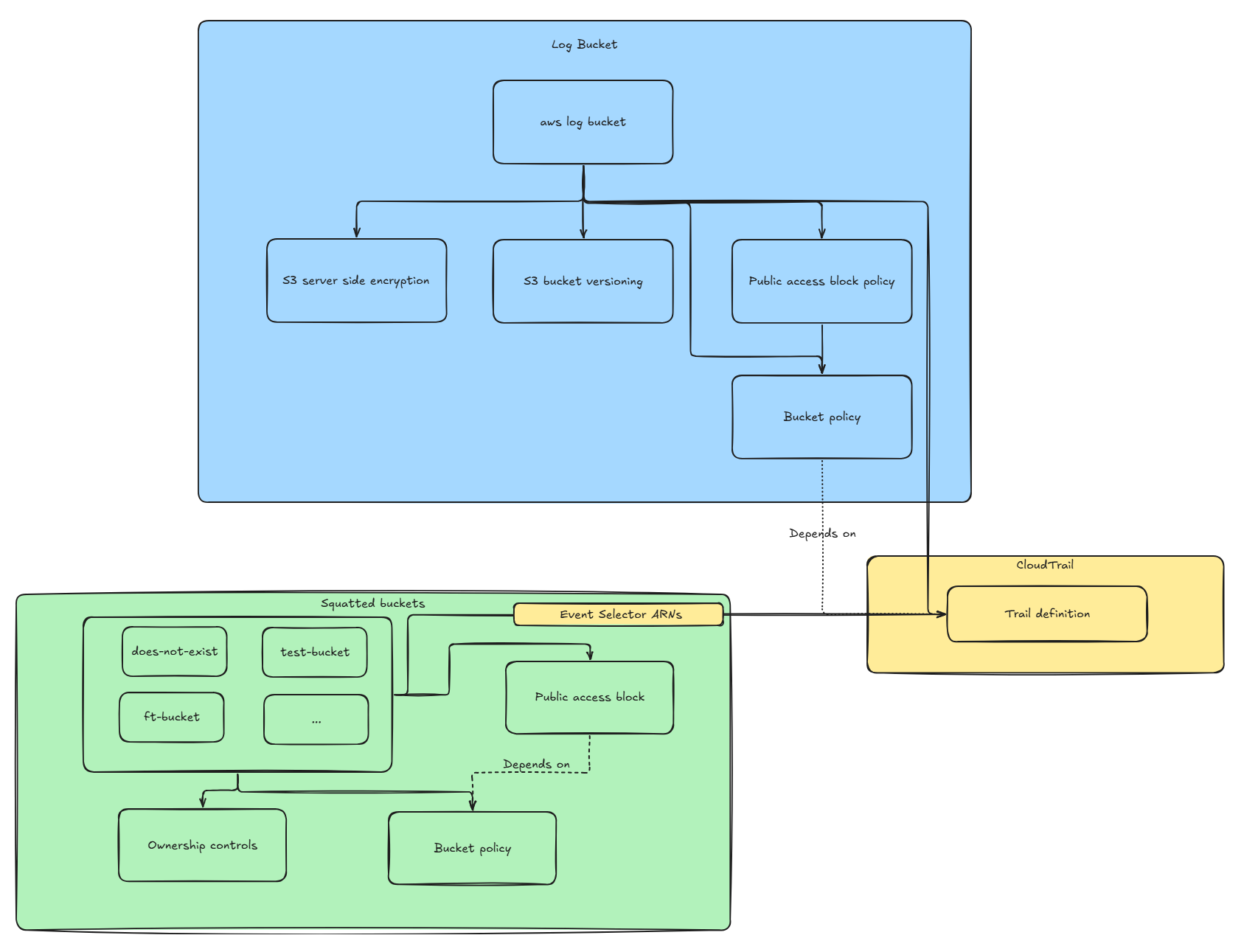
In order to deploy our buckets and ingest events made against them, we’ll need three core components:
- The S3 bucket “generator” for the buckets we intend on squatting
- Another S3 bucket to store the logs that were captured
- The CloudTrail configuration to capture the events related to those buckets
For those who already know what they’re doing, you can simply skip this part and keep doing your thing. For those who are a bit less familiar, here’s the architecture we’ll be designing:
The S3 bucket generator
For the buckets we want to squat, we’ll first start by defining the list of bucket names we want and store it in a Terraform locals variable as it’ll allow us to iterate over the list. Since we’ll make our bucket public, it’s important that the name isn’t taken yet. I’m a bit lazy so I’ll leave automating this as an exercise to the reader. In our case, we’ll want to deploy a bucket called does-not-exist-bucket and ft-dummy-bucket. The list can be defined as such:
locals {
  honeypot_buckets = toset([
    "does-not-exist-bucket",
    "ft-dummy-bucket"
  ])
}
Once this is done, we can proceed with creating our bucket using the for_each meta-argument. Doing so will allow us to simply add new bucket names to our list without having to modify the other components.
resource "aws_s3_bucket" "dummy" {
  for_each = local.honeypot_buckets
  bucket   = each.key
}
Now that our buckets are defined, we can proceed with creating the policies related to them. This is important as, out of the box, the buckets will essentially be private and since we’re trying to be annoying, we want to make them as public as possible. For our use-case, we’ll allow all calls against our buckets since they’re meant to be extremely overprivileged.
resource "aws_s3_bucket_policy" "dummy" {
  for_each = local.honeypot_buckets
  bucket   = aws_s3_bucket.dummy[each.key].id

  depends_on = [aws_s3_bucket_public_access_block.dummy]

  policy = jsonencode({
    Version = "2012-10-17"
    Statement = [
      {
        Sid       = "PublicReadWrite"
        Effect    = "Allow"
        Principal = "*" <--- Policy applies to all principals
        Action = [
          "s3:*" <--- Allow all S3 related calls
        ]
        Resource = [ <--- Make this policy cover all buckets and their objects
          aws_s3_bucket.dummy[each.key].arn,
          "${aws_s3_bucket.dummy[each.key].arn}/*",
        ]
      }
    ]
  })
}
Once this is done, there’s one last step which is actually making our bucket public. That’s fairly simple.
resource "aws_s3_bucket_public_access_block" "dummy" {
  for_each = local.honeypot_buckets
  bucket   = aws_s3_bucket.dummy[each.key].id

  // All set to false here because the honeypot buckets need to be fully public.
  block_public_acls       = false <--- Rejects any PUT request that tries to set a public ACL on the bucket or its objects
  block_public_policy     = false <--- Rejects any PUT bucket policy that would make the bucket public
  ignore_public_acls      = false <--- Any existing public ACLs on the bucket/objects are ignored (not enforced)
  restrict_public_buckets = false <--- Restricts access to the bucket so only AWS services and authorized users can read, even if the policy says public
}
The log bucket
Now for our actual logs we want to be a bit smarter. Let’s start by creating our log bucket.
resource "aws_s3_bucket" "log_bucket" {
  bucket = "log-experimentation-bucket"
}
In contrast to our previous bucket, we want to make sure no public access is enabled.
resource "aws_s3_bucket_public_access_block" "log_bucket" {
  bucket = aws_s3_bucket.log_bucket.id

  block_public_acls       = true
  block_public_policy     = true
  ignore_public_acls      = true
  restrict_public_buckets = true
}
To make the compliance gods happy we’ll also enable server side encryption.
resource "aws_s3_bucket_server_side_encryption_configuration" "log_bucket" {
  bucket = aws_s3_bucket.log_bucket.id

  rule {
    apply_server_side_encryption_by_default {
      sse_algorithm = "aws:kms" <--- leverage KMS for the encryption
    }
  }
}
Out of precaution we can also enable bucket versioning which will allow us to revert our objects back to a “sane” version if something goes wrong.
resource "aws_s3_bucket_versioning" "log_bucket" {
  bucket = aws_s3_bucket.log_bucket.id

  versioning_configuration {
    status = "Enabled"
  }
}
We can then proceed with creating our bucket policy. In our case, we only want CloudTrail itself to be able to write to that bucket. It’ll need two sets of permissions. GetBucketAcl as CloudTrail calls it to verify the bucket exists before writing to it and PutObject to actually store the logs. Out of good practice, we’ll create two distinct SIDs that will contain the two distinct permissions.
resource "aws_s3_bucket_policy" "log_bucket" {
  bucket = aws_s3_bucket.log_bucket.id

  depends_on = [aws_s3_bucket_public_access_block.log_bucket]

  policy = jsonencode({
    Version = "2012-10-17"
    Statement = [
      {
        Sid       = "AllowCloudTrailAclCheck"
        Effect    = "Allow"
        Principal = { Service = "cloudtrail.amazonaws.com" }
        Action    = "s3:GetBucketAcl"
        Resource  = aws_s3_bucket.log_bucket.arn
        Condition = {
          StringEquals = {
            // Make sure we only allow our own CloudTrail to check the ACL of our log bucket
            "aws:SourceArn" = "arn:aws:cloudtrail:us-east-1:${data.aws_caller_identity.current.account_id}:trail/bucket-squatting-trail"
          }
        }
      },
      {
        Sid       = "AllowCloudTrailWrite"
        Effect    = "Allow"
        Principal = { Service = "cloudtrail.amazonaws.com" }
        Action    = "s3:PutObject"
        Resource  = "${aws_s3_bucket.log_bucket.arn}/AWSLogs/${data.aws_caller_identity.current.account_id}/*"
        Condition = {
          StringEquals = {
            // Ensure CloudTrail can write logs with the correct ACL so that we can read them later
            "s3:x-amz-acl"  = "bucket-owner-full-control"
            // Make sure we only receive logs from our own CloudTrail
            "aws:SourceArn" = "arn:aws:cloudtrail:us-east-1:${data.aws_caller_identity.current.account_id}:trail/bucket-squatting-trail"
          }
        }
      }
    ]
  })
}
Creating the actual trail
Now that all the bucket stuff is created, all that’s left is to create our actual trail which will capture and report events made against our buckets. As mentioned previously, we’ll want to specifically enable Data event logging for our buckets otherwise we’ll have finance knocking at our door.
resource "aws_cloudtrail" "experimentation" {
  name                          = "bucket-squatting-trail"
  s3_bucket_name                = aws_s3_bucket.log_bucket.id
  include_global_service_events = false
  is_multi_region_trail         = false
  enable_log_file_validation    = true

  advanced_event_selector {
    name = "S3DataEventsForHoneypotBuckets"

    field_selector {
      // Enable all data events
      field  = "eventCategory"
      equals = ["Data"]
    }

    field_selector {
      // Narrow down on S3 specific data events
      field  = "resources.type"
      equals = ["AWS::S3::Object"]
    }

    field_selector {
      // Narrow even further on our squatted buckets
      field       = "resources.ARN"
      starts_with = [for b in aws_s3_bucket.dummy : "${b.arn}/"]
    }
  }

  // Make sure the trail is only applied on our bucket policy once it's created
  depends_on = [aws_s3_bucket_policy.log_bucket]
}
Now that all of this is done, we can finally do a terraform apply to deploy all of this.
Reviewing the logs
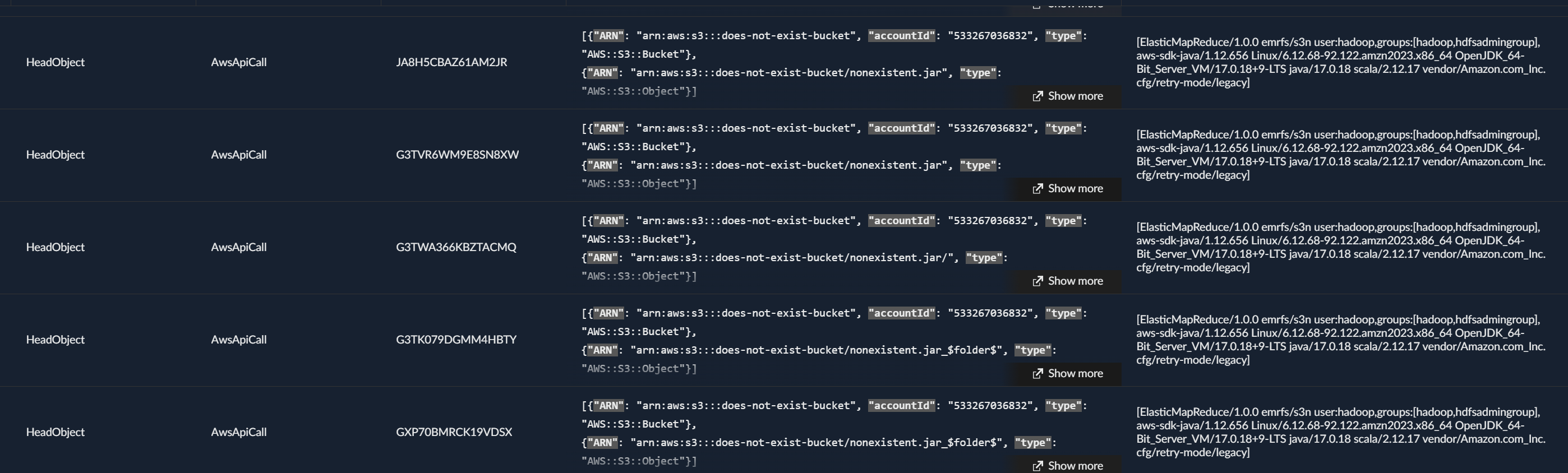
So I’m not much of a fan of getting sued into the ground by a megacorp so you’ll have to pardon me for being a bit shy on the details of what I ended up finding. This being said, we quickly see some tests pinging our buckets and some even uploading content.

How can I fix this?
Now something I was a bit surprised WatchTowr didn’t mention is how to fix this. Turns out it’s pretty simple, you can deploy a Service Control Policy (SCP).
On March 12th 2026, AWS released a new feature (the SCP in question) that allowed account owners to enforce public buckets to follow a “non-hijackable” (at first glance) bucket name scheme. Once this SCP is enforced, someone trying to create a bucket called my_potato_bucket will instead generate a bucket called my_potato_bucket-123456789012-us-east-1-an. The schema following this pattern: {bucketName}-{accountId}-{region}-an.
The idea behind this is that if all buckets created have a truly unique/non-hijackable naming convention, someone won’t be able to squat that bucket meaning any dangling resources won’t be squattable anymore.
Now before you go ahead and call it a day, there’s a few things worth keeping in mind.
First, the SCP only applies to new buckets. Any bucket that was created before the SCP was enforced still has its original predictable name. So if you delete an old bucket and someone claims the name before you recreate it, you’re still screwed. This means you need to audit your existing buckets and make sure none of them are at risk.
Second, the SCP doesn’t fix the actual leak. Your tests are still making real HTTP requests to S3. Even if nobody can squat the bucket name anymore, your CI/CD pipeline is still blasting out requests containing bucket names, object keys and in some cases actual file contents through PutObject calls. The real fix on the dev side is to make sure your mocks are actually mocking.
Third, this isn’t just a test problem. Hardcoded bucket names live everywhere. IaC templates, CloudFormation examples, Stack Overflow snippets, vendor documentation, old README files that haven’t been updated in 3 years. Any reference to an S3 bucket that no longer exists or never existed in the first place is a potential target. Tests leaking unmocked requests is just one vector.
And finally, the cost asymmetry here is brutal. You just read through an entire section about how monitoring S3 data events can run you $40k+ a month. Meanwhile the attacker’s cost to squat a bucket is literally zero dollars. An empty S3 bucket costs nothing. Even with objects being uploaded to it by victims, you’re talking pennies. You’re spending a fortune trying to see what’s happening while the attacker is chilling with a free bucket collecting your data.
WatchTowr showed how devastating this can be from a supply chain perspective. What I wanted to show here is the other side of the coin. The detection and visibility around S3 is painful, expensive and full of gotchas that most people don’t know about. Put the two together and you get a pretty grim picture of how something as simple as a bucket name can be a real liability.
Indicators of Compromise
No IOCs documented for this case.
Mapped MITRE ATT&CK Techniques
No MITRE techniques mapped for this case.